> For the complete documentation index, see [llms.txt](https://docs.mezzanine.xyz/llms.txt). Markdown versions of documentation pages are available by appending `.md` to page URLs; this page is available as [Markdown](https://docs.mezzanine.xyz/protocol/treasury-and-departments/signers-and-access-control.md).
# Signers & Access Control
The Mezzanine Protocol strives for complete mediation for access control between different actors within a company. A company in the Mezzanine Protocol is made up of its *Treasury*, [*Departments*](/protocol/treasury-and-departments/departments.md), and [*Modules*](/protocol/modules.md).
Access control in Mezzanine is hierarchical and follows a [tree-like data structure](https://en.wikipedia.org/wiki/Tree_\(data_structure\)), which in turn is similar to a traditional organizational hierarchy. At the *root* of the tree lies the Treasury. The signers of the Treasury, which, again, is a multi-signature wallet, are the company's *board of directors*. As such, they can perform actions that the signers of departments cannot. For example, they can issue authorized shares, add and remove departments or modules at any part of the organization*,* manage the signers of *any* department, etc.
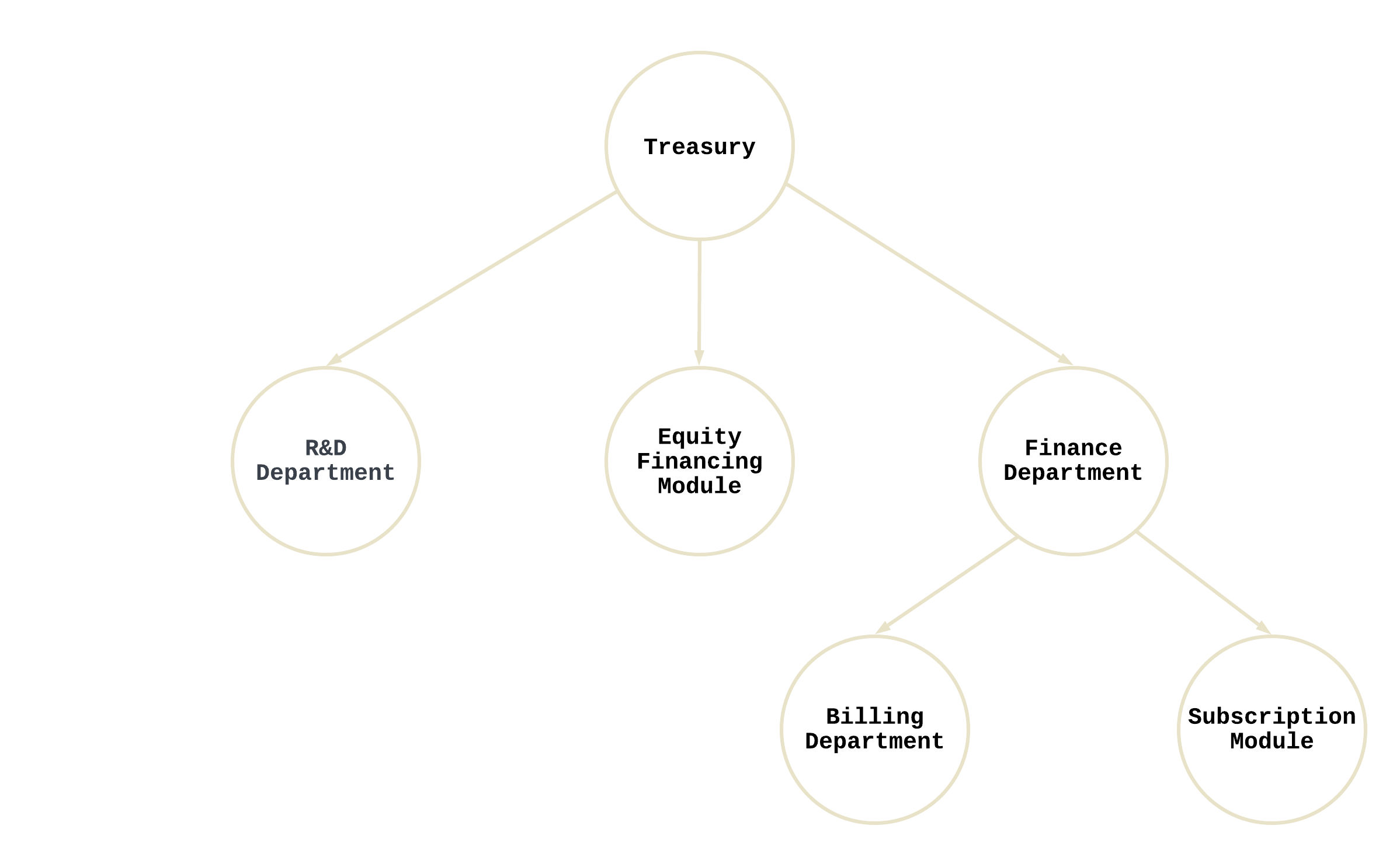
Below is a simple example of the organizational structure of a larger Mezzanine company:
The relationships in a tree data structure are commonly described via familial relationships. For example, the *parent* of the Finance Department in the above diagram is the Treasury. The *children* of the Finance Department are the Billing Department and the Subscription Module. An *ancestor* is a node that can be reached via repeated processing of child-to-parent relationships. For example, the Treasury is an *ancestor* of the Billing Department. Conversely, the Billing Department is a *descendant* of the Treasury.
The following are truisms about access control in Mezzanine Organizations:
* The treasury and a department can insert new modules or departments as *children*
* An ancestor can manage the signers and threshold for any *descendant* departments
For further demonstration, the Billing Department in the above example can insert new *modules* or *children* below itself. However, the Finance Department and Treasury are also able to do this on the Billing Department's behalf.
The creation and insertion of new modules in Mezzanine is standardized, enabling technical teams to easily create and develop those that best suit their needs. Moreover, 3rd party teams can easily sell modules as products to other Mezzanine companies. For example, a team may develop a subscription module, which represents unique recurring revenues via an ERC721. The team could then subsequently sell this module to other teams across the protocol.
Due to the bespoke nature of modules, truisms regarding them are impossible to enforce. However, we encourage teams to build modules with the following in mind:
*Any admin-like functionality should be executable by an ancestor*
Building upon the subscription module example, assume that each instance of a subscription module requires access control to determine pricing. Pricing should then be set by any of its ancestors, not just its parent.
Unlike departments, a treasury *does not* have a parent. Rather, its signers (i.e. the board of directors) are managed by a *shareholder governance* process. There are [three different governance structures](/protocol/shareholder-governance.md) the organization can choose. Through shareholder governance, board members can be added, removed, or swapped.
Modules and departments can also be removed as children at will with a couple of exceptions:
* A treasury can only have a single *Equity Financing Module* and it cannot be removed
* The *Equity Financing Module* cannot be inserted as a child by a department
## Multi-Signature Wallets
Multi-signature wallets require a minimum threshold of approval to complete an action. This is gererally referred to as "n of m" approval.
For example, Alice, Bob, and Charlie are the signers of a multi-signature wallet with a threshold of two. Therefore, only two of them are required to sign to be able to execute an arbitrary transaction. Signers of Safe Wallets are not limited to [Externally Owned Accounts ](https://ethereum.org/en/developers/docs/accounts/)(EOAs) but can also be smart contracts, such as[ EIP-4337 ](https://eips.ethereum.org/EIPS/eip-4337)Smart Wallets.
*Learn more about Safe* [*here*](https://docs.safe.global/getting-started/readme)*.*
As multi-signature wallets, departments and treasuries can interact with any other smart contract. However, it is recommended to interact solely with *established* protocols outside of Mezzanine instead of novel ones, which are more prone to exploitation. For example, assets stored in the Treasury can be lent on a decentralized lending-and-borrowing protocol, such as [AAVE](https://aave.com/), to earn a yield. Similarly, they can be swapped on decentralized exchanges, such as [Uniswap](https://uniswap.org/), for other assets, which can then in turn be used to pay contractors. However, once assets leave Mezzanine's smart contracts, there is no means by which the Mezzanine team can prevent funds from being lost in the event of an exploit.
---
# Agent Instructions
This documentation is published with GitBook. GitBook is the documentation platform designed so that both humans and AI agents can read, navigate, and reason over technical content effectively. Learn more at gitbook.com.
## Querying This Documentation
If you need additional information that is not directly available in this page, you can query the documentation by asking a question.
Perform an HTTP GET request on the following URL with the `ask` and `goal` query parameters:
```
GET https://docs.mezzanine.xyz/protocol/treasury-and-departments/signers-and-access-control.md?ask=&goal=
```
`ask` is the immediate question: it should be specific, self-contained, and written in natural language.
`goal` is what the user is ultimately trying to achieve, the reason they need the answer. Sharing it helps GitBook give you a better, more relevant answer. A goal is most helpful when it describes the outcome the user wants rather than restating the question. For example, with `ask=how do I create an API token`, a goal like `automate deployments from our CI pipeline` lets GitBook tailor the answer to that use case.
The response will contain a direct answer to the question and relevant excerpts and sources from the documentation.
Use this mechanism when the answer is not explicitly present in the current page, you need clarification or additional context, or you want to retrieve related documentation sections.